GIS Automation

Turn manual spatial work into a system that runs cleanly

We automate spatial workflows for municipalities, utilities, and infrastructure teams — asset inventory, survey processing, and data pipelines with QA and runbooks.

Geospatial Solutions LLC Washington, DC Operating since 2018 35+ clients
Asset inventory workflowsException queuesScheduled outputs
css-workflow-reveal

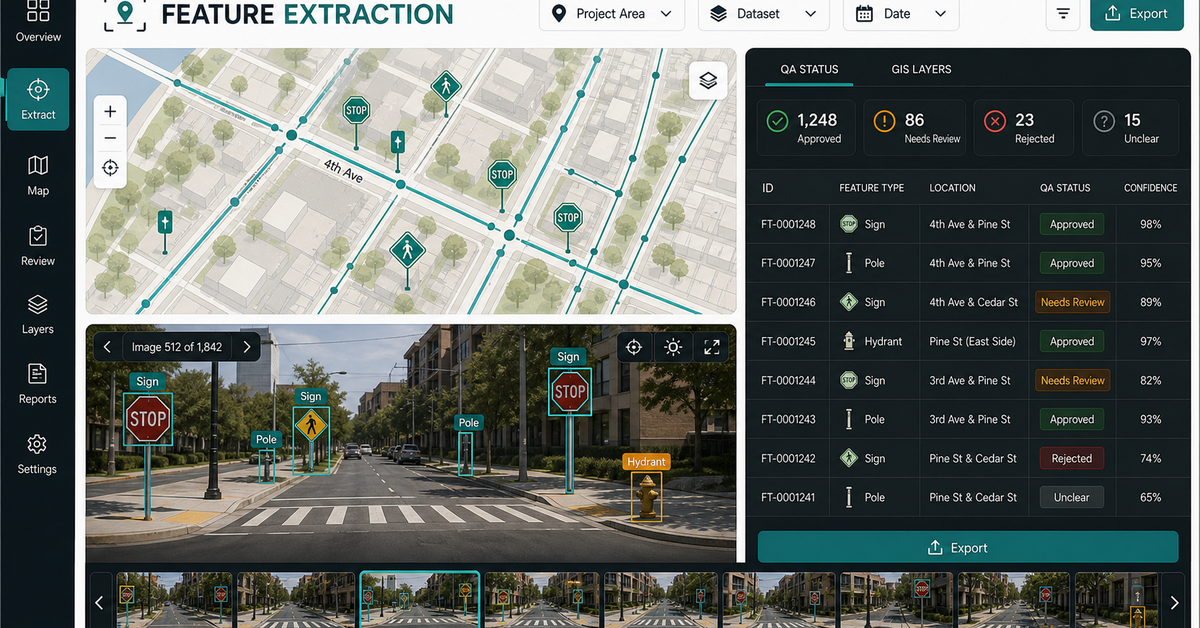
Asset records, inspection queues, QA status, and scheduled outputs

Municipal and utility teams need clean queues, not more manual GIS desktop work.
Buyer fitSearch intentmunicipal workflow
The status quo

What we eliminate

What we deliver

What we automate

2-4weeks

Typical first-workflow build, full source transfer at handoff

ArcGIS Workflow Automation

Python and arcpy scripts that run geoprocessing, publishing, and data sync on a schedule — with validation and exception handling in scope.

02

Asset Inventory Pipelines

Automated asset import, validation, and updating from field data, CAD, and survey sources.

03

Data Pipeline Management

Scheduled ETL from field apps, GPS devices, and third-party APIs into your GIS of record.

04

QA & Runbooks

Documented workflows with topology checks, attribute validation, and runbooks so the system doesn't depend on one analyst.

05

Scheduled Reports

Maps, statistics, and change detection delivered to stakeholders automatically — no analyst in the loop.

Proof-led positioning

What this page needs to make obvious

Municipal GIS automation, utility GIS automation, and asset inventory automation.

01

Asset inventory workflows

Keep inspections, source photos, map records, and QA status tied together.

02

Exception queues

Flag missing attributes, duplicates, poor geometry, and records that need human review.

03

Scheduled outputs

Reports, dashboards, export layers, and review packets generated on cadence.

Proof workflow

Input, review, evidence, output.

Modeled on the live Geospatial Solutions demos: the page should show what the buyer sends, what they review, what evidence stays visible, and what they receive.

01

Input

Asset layers, inspection tables, sign inventories, field submissions, GIS databases, and manual review steps.

02

Review surface

Automation creates the queue, flags records that need review, and preserves source context.

03

Evidence

Each output keeps validation status, exception reason, source record, and reviewer state visible.

04

Output

Scheduled report, dashboard, feature layer, CSV, GeoJSON, or runbook.

Source and limits

Technical trust should stay visible.

Confidence

Automation should leave a visible review state for records that need human attention.

Caveat

Public-sector workflows often need source and limitation notes preserved.

Source

Asset layers, inspection tables, sign inventories, field submissions, GIS databases.

QA boundary

Automated checks plus manual review queues and correction logs.

Export path

Scheduled report, dashboard, feature layer, CSV, GeoJSON, or runbook.

Before the first call

What you send · What you get

No vague discovery phase. You bring four or five things, we return a specific plan you can evaluate.

What you send
  • 1Description of one workflow your team runs repeatedly
  • 2Source data sample (CSV, shapefile, GDB, screenshot is fine)
  • 3Destination system (ArcGIS Online, Power BI, PostGIS, etc.)
  • 4Cadence (hourly, daily, weekly) and trigger (schedule, webhook, manual)
  • 5Any current automation attempts and where they break
What you get back
  • 1Written automation scope returned within 48 hours
  • 2Effort estimate with fixed-price build option
  • 3Tech stack recommendation (Python, Node, Docker, serverless)
  • 4Risk + exception handling plan with named failure modes
  • 5Runbook structure preview so your team can evaluate maintainability
Sample deliverable

A pipeline run, as your team would see it in production

Structured logging on every step. When something fails, your on-call knows what failed and why before they open the runbook.

log
[2024-08-15 14:23:08] INFO  pipeline.survey123_sync start
[2024-08-15 14:23:08] INFO  fetch.survey123 form_id=da472a records=14302 elapsed=412ms
[2024-08-15 14:23:09] INFO  validate.schema passed=14302 failed=0
[2024-08-15 14:23:11] INFO  geometry.buffer features=14302 radius=500m elapsed=2.1s
[2024-08-15 14:23:14] INFO  spatial.join layer=parcels result=27894 elapsed=3.2s
[2024-08-15 14:23:17] INFO  publish.arcgis_online service=ParcelsBuffered version=v847 elapsed=2.8s
[2024-08-15 14:23:17] INFO  pipeline.survey123_sync complete duration=9.2s next_run=2024-08-16T02:00:00Z
Deliverables

What you walk away with

How we work

A scoped path from sample data to running system

No open-ended retainers. No "discovery phases" that bill for months without producing anything you can evaluate.

  1. 01

    Discovery

    We shadow your team for a week — watch the workflows, catalog the pain points, and rank automation candidates by hours saved per quarter.

  2. 02

    Build

    First workflow in 2-4 weeks. Python or TypeScript, with validation, exception handling, and structured logging from day one.

  3. 03

    Harden

    30 days in production with us on call. We catch the edge cases, tighten the validation, and document the failure modes.

  4. 04

    Handoff

    Runbook, infrastructure-as-code (Docker or serverless), and full source. Your next analyst can read it without reverse-engineering.

Live on geospatialsolutions.co

Click into the actual work

These open the real, interactive demos on our main site — not screenshots, not videos. Click around before you decide to talk to us.

Why teams trust us
Questions teams ask before they engage us

Common questions, answered honestly

We're a small utility. Is this overkill for our size?

No. Most of our utility clients are 50-500 staff. We size the automation to your team — a 200-staff municipality doesn't need a Kubernetes cluster, just a scheduled Python script with logging and a runbook.

Do you work with ArcGIS Enterprise behind a firewall?

Yes. We deploy into your environment, respect your security boundary, and integrate with your existing ArcGIS Enterprise identity model. No data leaves your firewall unless you choose to send it.

What's the ROI on a typical automation engagement?

Most clients see payback in 4-9 months on the first workflow. Subsequent workflows reuse the framework, so payback shrinks. We share the ROI math during scoping so you can validate independently.

Can you train our GIS team to build automations themselves?

Yes. Many engagements include a 'shadow build' phase where your team builds alongside us, learning the patterns. By month 3 most teams can scope and build new workflows independently.

More from Geospatial Solutions

Adjacent services your team may need

Book a free workflow review

Show us one workflow. We will tell you what to automate first.

Bring the workflow that takes the longest every week. We will scope an automation candidate with effort estimates and a written delivery plan within 48 hours.

Automate one municipal GIS workflow